.svg)


%201.svg)
%201.svg)
%201.svg)



.svg)












.avif)
.avif)
.png)





.avif)






%20Data%20to%20Me_BLOG_1080x600.avif)


.avif)


.avif)


.avif)


.avif)


No items found.


Keeping your Salesforce Sandboxes and environments in sync is crucial to the success of your organization. However, it is a critical area often overlooked until DevOps teams experience out of sync environments — resulting in merge conflicts, overwrites, erroneous deployments and other business challenges.
Managing environments is the cornerstone of an efficient DevOps process, yet not many teams prioritize it in their day-to-day workflows. This article covers the best practices of developing an environment strategy and provides recommendations on leveraging your people, processes and tools to maintain your environments and build a deployment package that works for you.
According to a survey by Copado, nearly 60% of Salesforce professionals experience issues caused by out of sync sandboxes. That begs the question: if the majority of us know the consequences of sandbox misalignment, why do we still struggle with this critical aspect of DevOps?
Keeping sandboxes in sync requires a holistic approach, optimizing all aspects of the software development lifecycle, starting with the people, then the process and, finally, the tools. If these three pieces of the puzzle are not aligned, it will create challenges that can ultimately lead to an environment maintenance nightmare.
The root of these challenges lies in the issue of conflicting metadata types changed by different team members across multiple sandboxes and then keeping track of these changes to a shared codebase. When there are disparate versions of the same component in different environments, merge conflicts occur in higher environments. At the same time, developers work on features in a new sandbox that are out of sync with the existing sandbox that’s in production. This can lead to changes being made directly in higher-level environments rather than at the developer sandbox level, which causes further inconsistencies and costly delays.
To avoid these challenges, it’s important to create a process surrounding environment management. Environment management encompasses all activities surrounding the planning and maintaining an organization's Salesforce environments.
Once you have an environment management strategy in place, you should define a scalable approach that enables your team to deliver value while combating the factors that cause environments to fall out of sync. Defining an environment strategy is crucial to the long-term success of your delivery organization and should not be taken lightly. At a high level, it can be broken down into three distinct categories:
Let’s look at what goes into each category and then walk through some industry standard best practices for a robust and efficient DevOps process.
To implement environment management, it is crucial to understand the needs of your organization and the Salesforce delivery team. Ask yourself:
Once you have conclusive answers to these questions, you have the information needed to define your environment types and quantity and you can categorize them based on their intended purpose. Follow a standardized naming convention to label your environments before establishing the topology: relationships and dependencies between Salesforce environments and any external tools or data sources.
At this point, you likely have determined the structure of your pipeline. You know how many environments are there in your pipeline, how they are connected and what you need to define the behavior that occurs as changes are created, tested, and then migrated from one environment to the next.
The planning phase defines and enforces a transparent deployment process. By systematically enforcing and automation of these practices, you establish a robust and reliable deployment process that promotes consistency and efficiency in your Salesforce environments.
Now that you have determined your pipeline structure and its behavior, it’s time for you to implement best practices surrounding security, documentation, ongoing monitoring, and maintenance. For your environment strategy to be upheld, it needs to be documented and communicated to the broader team, along with any environment maintenance policies that have been outlined. Finally, establish an environment strategy review cadence to adapt your process to the evolving needs of your industry and company.
Keeping environments aligned isn’t just a DevOps philosophy — it’s an operational discipline within a modern Salesforce environment. High-performing teams combine sandbox refresh strategies with continuous synchronization workflows that prevent drift before it becomes a release risk.
One of the most effective ways to maintain alignment is through regular metadata comparison between environments across both the production and sandbox org. Rather than waiting for a full refresh cycle, teams should proactively detect differences in custom metadata types and deploy updates incrementally.
A typical workflow includes:
This incremental approach supports Copado’s belief that quality is built into every step of the release lifecycle, not added at the end.
Production hotfixes are one of the biggest causes of sandbox drift, especially after the refresh process. Without a back-promotion strategy or a post-refresh checklist, teams unknowingly test against outdated configurations.
To maintain trust across environments:
Back-promotion helps teams collaborate more effectively — because people are the code, and accurate environments empower better decision-making.
While every Salesforce org is different and calls for unique requirements and processes, there are industry standard best practices that revolve around environment strategies. The following best practices serve as guidelines to help orgs optimize their Salesforce implementations and ensure consistency, scalability and maintainability:
(1) Implement Agile Planning: Agile planning can vastly benefit your Salesforce Sandbox development process. The methodology entails a rapid and iterative approach to development, prioritizing high quality at every stage. You can anticipate and resolve issues early by breaking down tasks into smaller, more manageable chunks and putting a premium on quality from the outset.
This makes for a more efficient development process, with fewer hiccups in higher-level environments. Moreover, the agile approach emphasizes customer satisfaction by creating a continuous feedback loop so that changes can be made as early on in the process as possible. This ensures that the final product meets and exceeds the needs and expectations of your customers.
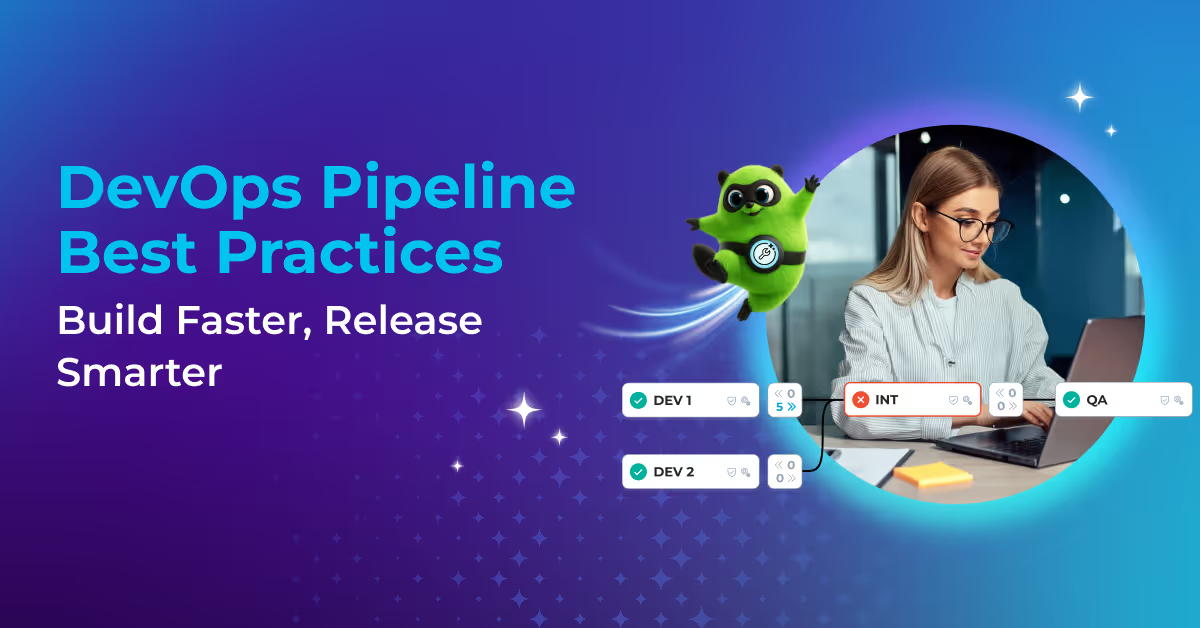
(2) Enforce Clear Deployment Path: Having a clear deployment path ensures that delivery teams are all on the same page and should be customized to fit the needs of your business. A best practice promotion path begins in a developer sandbox, at least one integrated testing environment, UAT or Staging, Production and then a hotfix environment to manage potential production bugs impacting end users.
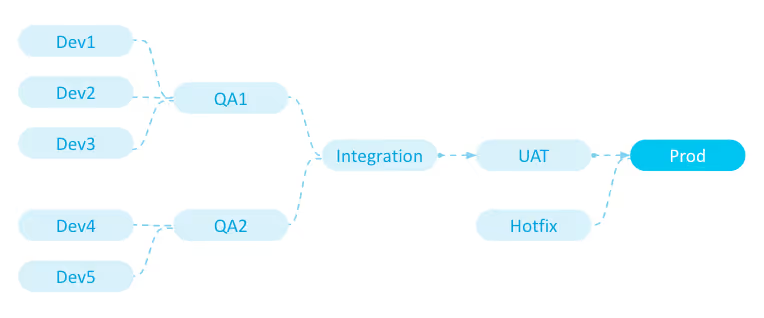
(3) Develop Strictly in Developer Environments: It is crucial to ensure that developers only make changes in developer environments to avoid out of sync issues and delays in the release process. By working in their own sandboxes, developers can promote parallel and isolated development, allowing for greater control over the development process.
This also enables developers to work on features and changes in a controlled environment before pushing them to higher-level sandboxes for testing and deployment. Additionally, working in their own sandbox allows developers to avoid merge conflicts caused by conflicting metadata changes, ensuring that code changes remain isolated and organized. Implementing these practices can lead to faster development and deployment times, promoting greater overall efficiency and quality.
(1) Decide on Consistent Tooling: Multiple tooling options exist to manage Salesforce deployments. These include out-of-box functionality called “Change Sets,” CLI, the metadata API tool, and other third-party additions ranging from lightweight to heavyweight all-in-one Salesforce deployment tools.
The tooling choice will depend on an organization's specific needs and will impact the capability of a delivery team to follow DevOps best practices. Regardless, once a tool is selected, it should be used consistently across the entire team, who might need to be trained on how to use it effectively.
(2) Implement Version Control: Version control is critical for businesses of all sizes. Tracking and managing code changes helps your developers identify and eradicate errors easily and allow them to work collaboratively, efficiently and safely. Some common Git-based version control repository platforms include Github, Gitlab, Bitbucket and Azure Repos — any of which can be used effectively in storing Salesforce metadata code history. If made possible by tooling, it is also a good practice to enforce a standardized branching strategy and streamline branching activities to save time, reduce the risks of human errors and enable admins or developers to use version control regardless of their level of Git knowledge. Learn more about implementing version control through Copado's Salesforce source control guide.
(3) Enforce Quality with a “Shift-Left” Mindset: The principle of Shift Left emphasizes the importance of early and frequent testing to catch any potential issues as soon as possible. This means testing features and functionality as soon as they are developed rather than waiting until the end of the development cycle.
Embracing the shift left mentality and enforcing quality gates lets organizations identify and address issues early in development, preventing inconsistencies and discrepancies between sandboxes. These practices facilitate early detection of problems, minimize regression issues, and ensure that only high-quality and tested code progresses through the development pipeline, keeping sandboxes in sync and promoting overall application stability.
Quality gates should be required and run in each environment to ensure that all changes are being tested and approved at every stage of the deployment process. These quality gates could include validation deployments, unit tests (Apex Tests, SCA), and functional testing and approvals. Once a test strategy has been designed, it is crucial to make sure that they are enforced. Developers should only be able to deploy changes to a higher environment once they have ensured that their updates comply with an organization's quality standards.
(4) Enable Continuous Integration and Deployment (CI/CD): Integrating your sandbox strategy with CI/CD best practices is crucial for streamlining build, testing and release processes. By implementing Continuous Integration (CI), changes committed to the version control system trigger automatic builds and tests. This ensures frequent validation and merging of code changes, minimizing conflicts and discrepancies between sandboxes.
By leveraging version control, automated build processes and comprehensive testing, you establish a streamlined CI pipeline that guarantees code consistency and quality. Furthermore, extending automation to include Continuous Deployment (CD) allows you to streamline the release process and, move changes seamlessly from the sandbox to production. This approach reduces manual errors, improves collaboration and enables faster, more reliable deployments.
(1) Define and Enforce Roles, Authorization, and Access: When implementing a successful Salesforce CICD strategy, it is essential to establish clear roles and responsibilities within the team. Each team member should only be given enough access to perform their specific job functions without compromising the security of the organization's Salesforce environment.
Regarding access control, the principle of least privilege should be applied. This means that each team member should only have access to the resources and information they need to do their job effectively. For example, developers should only have write access in their personal developer environments. This will enforce that all changes start at the development level and are applied to every environment in the pipeline before reaching production.
(2) Create a rollback strategy and (if possible) automated back promotions: A rollback strategy is a backup plan that enables the rapid reversal of changes made to sandboxes should an error occur while promoting new features. Automation of back promotions allow developers to roll back changes from production to sandbox environments automatically.
This process ensures that the sandbox remains in sync with the production environment and reduces the risk of discrepancies between the two environments. Implementing a rollback strategy and back-promotion processes will minimize downtime in the event of production errors and make it easier to revert changes, reducing the number of headaches and potential errors that could arise due to user errors.
(3) Plan for Sandbox Refresh and Data Management: When planning to refresh a Salesforce sandbox, scheduling ahead of time is especially important if back promotions aren’t available with your selected tooling, as lower-level environments will not be maintained with updates made across other dev environments.
Before a refresh, it is a good practice to leverage version control by taking a snapshot of environments so that all work is saved in case there are in-flight changes that were never committed. Scheduling sandbox refreshes and effectively communicating these plans to the rest of the team ensures that any in-flight changes are migrated or backed up before a refresh.
It’s also critical to ensure that you have the correct data and calculate data loading time in advance, as data migrations can take several days. If working with sensitive data, establish policies and procedures for masking and anonymization in non-production sandboxes. Ensure that sensitive customer data is adequately protected to comply with data privacy regulations and to prevent data breaches.
(4) Monitor Org Health with Automated Regression Testing: Effective monitoring practices help DevOps teams proactively maintain the overall health of their Salesforce implementations. Teams can leverage automation in testing frameworks and tools to ensure new changes don't inadvertently break existing functionality or affect system performance. This testing approach involves creating a suite of test cases that can be executed regularly to verify that system functionality remains intact as changes are made.
(5) Document, Communicate, Track, and Evolve: Document your sandbox strategy, including sandbox types, refresh schedules, data management policies, access control and integration with CI/CD processes. Ensure you communicate this strategy to all relevant stakeholders, including developers, testers, administrators and release managers to ensure a shared understanding and adherence to the defined processes. Finally, set up a regular review cadence to collect feedback and continuously refine your strategy.
Refreshes are essential, but they’re not a silver bullet. Understanding how they work — and their limitations — helps teams execute more resilient DevOps services and solutions.
Refreshing a sandbox depends on the type of sandbox, as each has different refresh schedules and capabilities. Teams should align refresh strategies with development and testing needs.
Common considerations include:
Planning refreshes around sprint cycles helps reduce disruption, maintain sync with production, and support automated deployment.
Not all components transfer to a refreshed sandbox, especially if a team uses custom settings and configurations. Your team will need to keep track of these customizations in order to ensure a smooth transition. Teams should understand:
Clear expectations prevent post-refresh confusion and keep teams aligned around release readiness.
Maintaining a robust and efficient environment strategy in today's fast-paced digital era is crucial for businesses striving to outpace their competition. To achieve a successful environment strategy, it is essential to foster a collaborative and transparent culture while assembling a team that values quality, communication, and adherence to best practices.
Businesses can minimize the risks associated with out of sync sandboxes by implementing a well-defined development pipeline, enforcing stringent quality standards and employing robust change management and Salesforce automation tools tailored to the organization's needs.
It is essential to recognize that environment management is an ongoing endeavor that requires continuous monitoring. Regular reviews and refinements of the environment strategy ensure that businesses remain adaptable to the evolving needs of the Salesforce platform and industry trends. In conclusion, it is crucial to prioritize the development of a robust and future-proof environment management strategy, enabling streamlined development processes, mitigating risks and optimizing Salesforce implementation to drive the growth and success of your business.
See Copado Best Practices In Action
With a background in Salesforce Delivery Consulting at IBM, Cassia has had a lot of experience with the value that a good DevOps process and strategy can bring to a team and the pain that process inefficiencies and decentralized tooling can cause. Since joining Copado as a Sales Engineer almost two years ago, the author has worked closely with numerous prospects - many of whom had encountered challenges from out-of-sync Sandboxes. Drawing on her Salesforce knowledge and hands-on experience with Sandbox management, the author provides readers with practical tips and advice on revamping, streamlining, and maintaining synchronicity throughout their pipeline(s).
Release Faster, Eliminate Risk, and Enjoy Your Work.
Try Copado Devops.
Explore our DevOps resource library. Level up your Salesforce DevOps skills today.


.avif)


.svg)